

1.อยากกลับไปใช้ IE8
2.ถอน IE 9, IE 10 ยังไง
มาทางนี้เลย www.treranan.com จะบอกวิธีให้จ้า ^_^
1. Start > All Program > Control Panel > Program and Features
2. เลือก View Installed Update
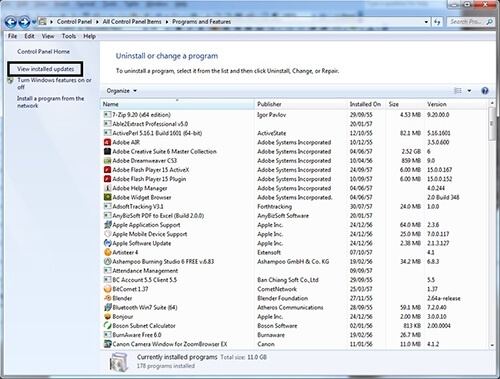
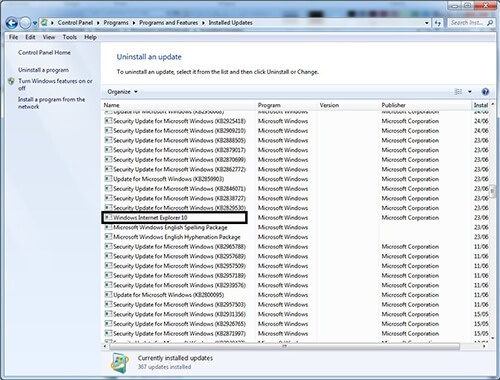
3.ค้นหา Windows Explorer10 หรือ Windows Explorer9 ดับเบิ้ลคลิกเพื่อถอนออกทีละขั้นตอน จนเจอเป็น Windows Explorer 8 ตามที่ต้องการ..แค่นี้ก็เรียบร้อยแล้วง่ายจริง ๆ
วิธีถอน IE อยากจากเครื่อง
1. Start > All Program > Control Panel > Program and Reatures
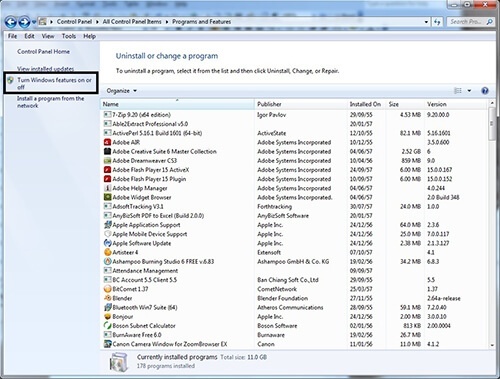
2. เลือก Turn Windows features on of off
3. คลิกเครื่องหมายถูกออกหน้า โปรแกรม Internet Explorer
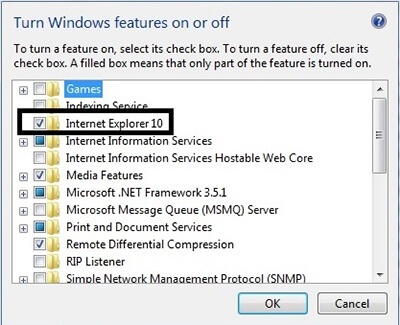
4. จากนั้น Restart เป็นอันเรียบร้อย[/vc_column_text][/vc_column][/vc_row]